Virtual controllers.
Real identity.

User-mode virtual controllers for Windows. No kernel driver, no network, no reboot. DirectInput, XInput, SDL3, the browser Gamepad API, and WGI all see the exact identity of real hardware, down to the bus type.

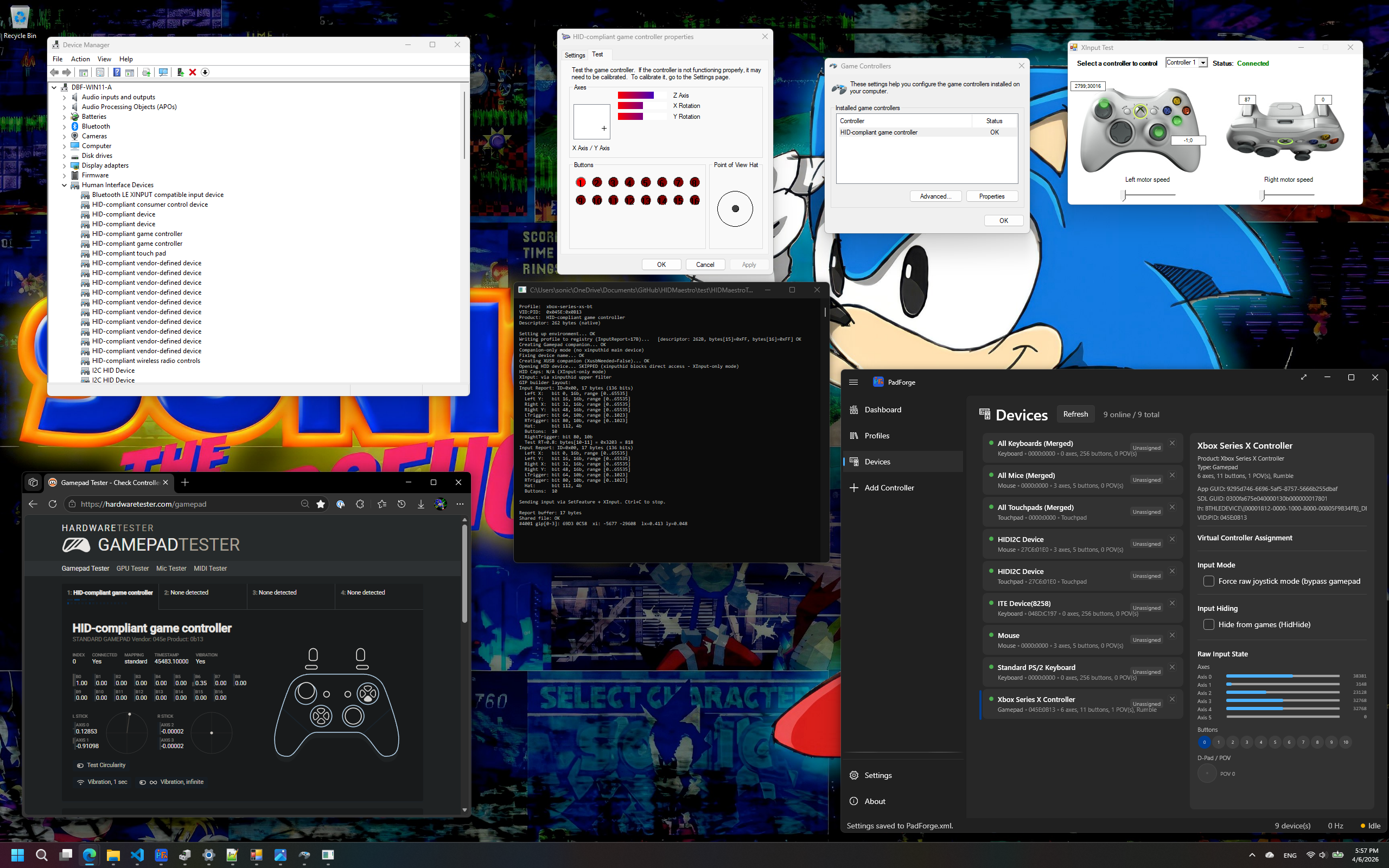
A virtual Xbox Series X|S Bluetooth controller shown identically in Device Manager, joy.cpl, Chrome Gamepad Tester, and PadForge/SDL3
228device profiles built in
32vendors covered
~35µsmedian single-press latency
0kernel drivers installed

Three calls

Install once. Create controllers on demand.

1

Reference the SDK

One DLL, HIDMaestro.Core.dll, with the 228-profile catalog, the driver binaries, and the signing tools embedded. Grab it from a release ZIP or build from source.

2

Install the driver

InstallDriver() is self-bootstrapping: it creates a locally trusted certificate, signs the driver, and installs it. No EV certificate, no test-signing mode, no reboot. When the installed driver already matches, the call completes in ~40-60 ms.

3

Create and drive

Pick a profile, call CreateController, submit input. A single controller is live in about 200 ms. Dispose it and the device disappears, with no leftover PnP state.

The whole lifecycle is one page of C#. The game on the other side sees an Xbox 360 pad indistinguishable from the real thing.

using var ctx = new HMContext();
ctx.LoadDefaultProfiles();
ctx.InstallDriver();
using var ctrl = ctx.CreateController(
    ctx.GetProfile("xbox-360-wired")!);
ctrl.SubmitState(new HMGamepadState { Buttons = HMButton.A });

Identity

Exact hardware identity, down to the bus.

Profile-driven VID/PID, product strings, HID descriptors, axis and button layout, and bus type. A Bluetooth controller reports as Bluetooth, not as a USB device wearing its name. SDL3's controller database matches it, Steam recognizes it, Chrome identifies it, joy.cpl shows the right name.

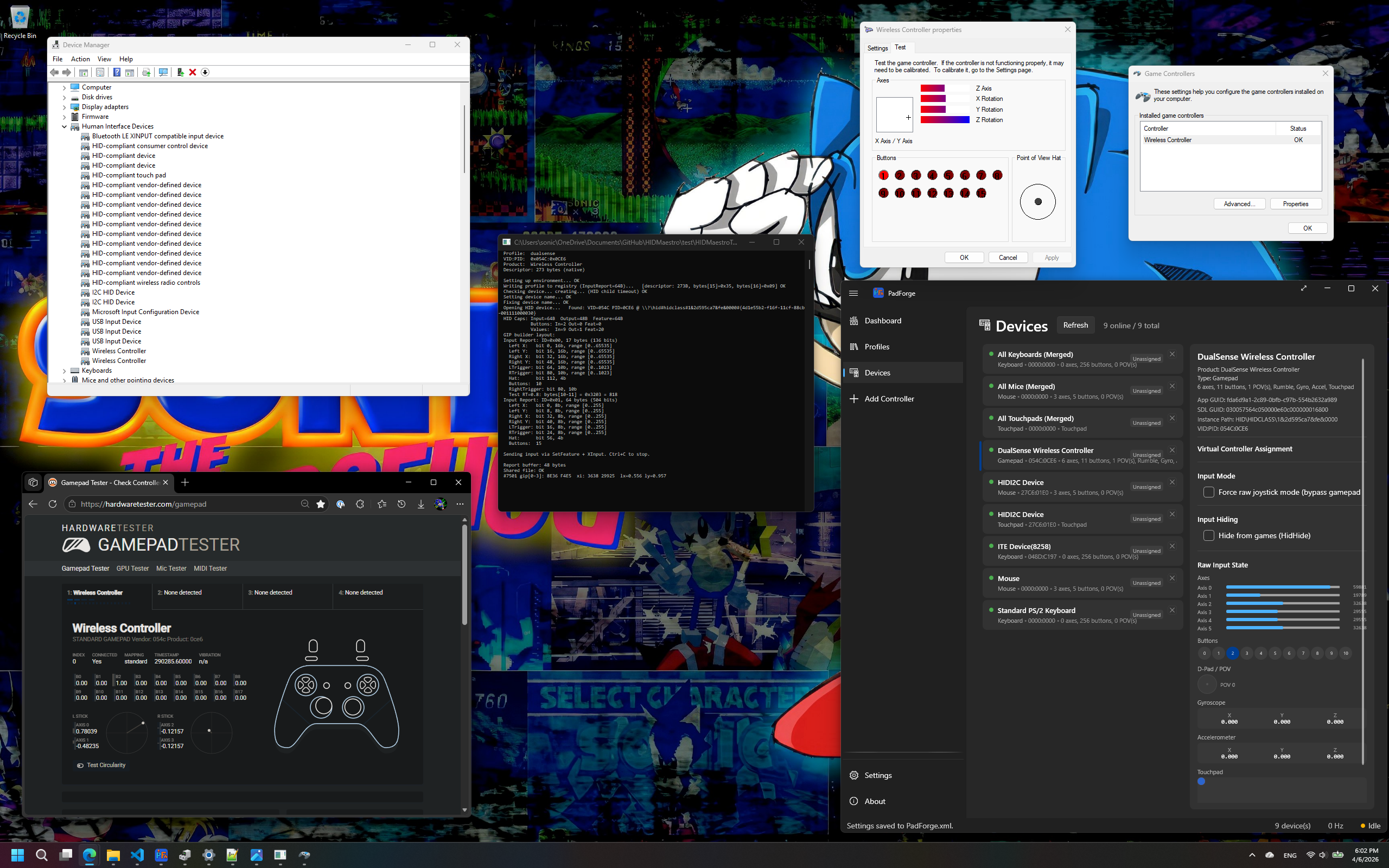
A virtual DualSense shown identically in Device Manager, joy.cpl, Chrome Gamepad Tester, and PadForge/SDL3
228 device profiles

Xbox to HOTAS, out of the box.

Embedded profiles across 32 vendors: Xbox 360, Xbox Series, DualSense, Thrustmaster, Logitech, flight sticks, racing wheels, and more. Every controller is a JSON file. Adding support for a new one means writing JSON, not modifying code.

Devices are JSON

New device, no recompile.

Add a controller by writing a data-only JSON profile or by capturing one you already own. No per-device source code, no recompile, no hardcoded device classes. Adding a controller to a code-per-device emulator means writing and compiling a new device implementation. That difference is the whole point of the profile system.

Protocol controllers

A Switch Pro that answers back.

The Switch Pro Controller is not a passive device: hosts drive a Nintendo subcommand handshake and stall without a device that answers. HIDMaestro's driver answers it over the real Bluetooth wire, with a descriptor extracted byte-exact from a live Pro's SDP cache: SPI calibration reads, input-mode switch, 60 Hz full-mode streaming with gyro and accel. SDL3 and Steam Input bind it as a real Bluetooth Pro Controller with motion and rumble.

Controller audio and haptics

The speaker, the mic, and the actuators.

A real USB DualSense is a four-interface composite, and three profiles present all four. Windows gets the pad's own Speakers and Headset Microphone endpoints, and the 4-channel stream behind them carries the speaker on channels 1 and 2 and the voice-coil actuators on 3 and 4. That stream is the only path on Windows by which a game hands a controller its authored haptic waveforms. It reaches your code as UsbAudio.Output with each channel's role named. Nothing extra to install: the USB transport ships inside the DLL and deploys itself the first time you create one.

Clone, build, capture

Your controller, or one that never existed.

Clone a DualSense and ship a 16-button variant that Windows, Steam, and games still see as a DualSense. Build a flight stick, racing wheel, or arcade panel from scratch with arbitrary VID/PID, axis count, button count, and resolution. Or point HMDeviceExtractor at any controller you have plugged in and get a ready-to-deploy profile back.

Latency

Lower latency, measured.

~35 µsHIDMaestro median single-press
0.15 msrumble/FFB delivery, event-driven (was 9.4 ms polled)

The input number is real propagation, measured over 10,000 single-press iterations and reproducible with one command. See the methodology.

Input latency, lower is better: HIDMaestro 0.035 ms versus VIIPER at 0.168 ms localhost, 1 to 5 ms over wired LAN, and 10 to 50 ms over Wi-Fi
The network bars use the optimistic end of each LAN range. Even granting VIIPER the best case, its Wi-Fi path runs hundreds of times longer than HIDMaestro's shared-memory path.
Shared memory, both ways

No socket. No batching cap.

HIDMaestro talks to its driver through shared memory on the same machine. No socket, no USBIP stack, no kernel transport driver in the path. Both directions are event-driven with no batching cap: input signals the driver per frame, and the driver signals each captured rumble/FFB/LED packet back to the consumer at ~0.15 ms median, over 60x faster than the previous 8 ms polled path, with idle controllers costing zero measurable CPU.

The comparison, honestly

VIIPER's number excludes its own network.

VIIPER's published Windows figure, 168 µs, is localhost-only. Running it over an actual network, the thing the project is named for, adds roughly 1 to 5 ms on wired LAN or 10 to 50 ms over Wi-Fi on top of that figure, a caveat its docs mention only in passing. It also batches reports every millisecond, capping the update rate at 1000 Hz. HIDMaestro's input is event-driven with no fixed cap.

The right layer

Networking belongs in the application.

Networking belongs in the application, not in the device driver. Tools built on USB/IP put a kernel USBIP driver and a listening socket in front of every user, even for purely local play. USB/IP can also only present USB devices, so a controller paired over Bluetooth shows up with the wrong bus type. HIDMaestro keeps the device layer local and sets bus type per profile, so a Bluetooth controller presents as Bluetooth. Network play still happens, at the right layer: PadForge, built on HIDMaestro, shares controllers across PCs with its Remote Link feature, both directions with feedback returning to the real device, at no cost to local play.

Fast to start, fast to recover

Live in about a second.

When the installed driver already matches, InstallDriver() completes in ~40-60 ms and a consumer goes from process start to a live controller in about a second. If the consuming app is force-closed mid-session, the next launch evicts the orphaned devices and has the first controller live again in ~2.3 s, measured with an Xbox Series BT profile in the mix, the deepest teardown stack.

Every API

One device. Every gaming API.

DirectInput sees correct axes and buttons. XInput sees separate triggers in one slot. SDL3/HIDAPI sees the right identity and bus type. The browser sees a STANDARD GAMEPAD with separate triggers. WGI sees one Gamepad. RawInput sees the same device as all of them, at the same time.

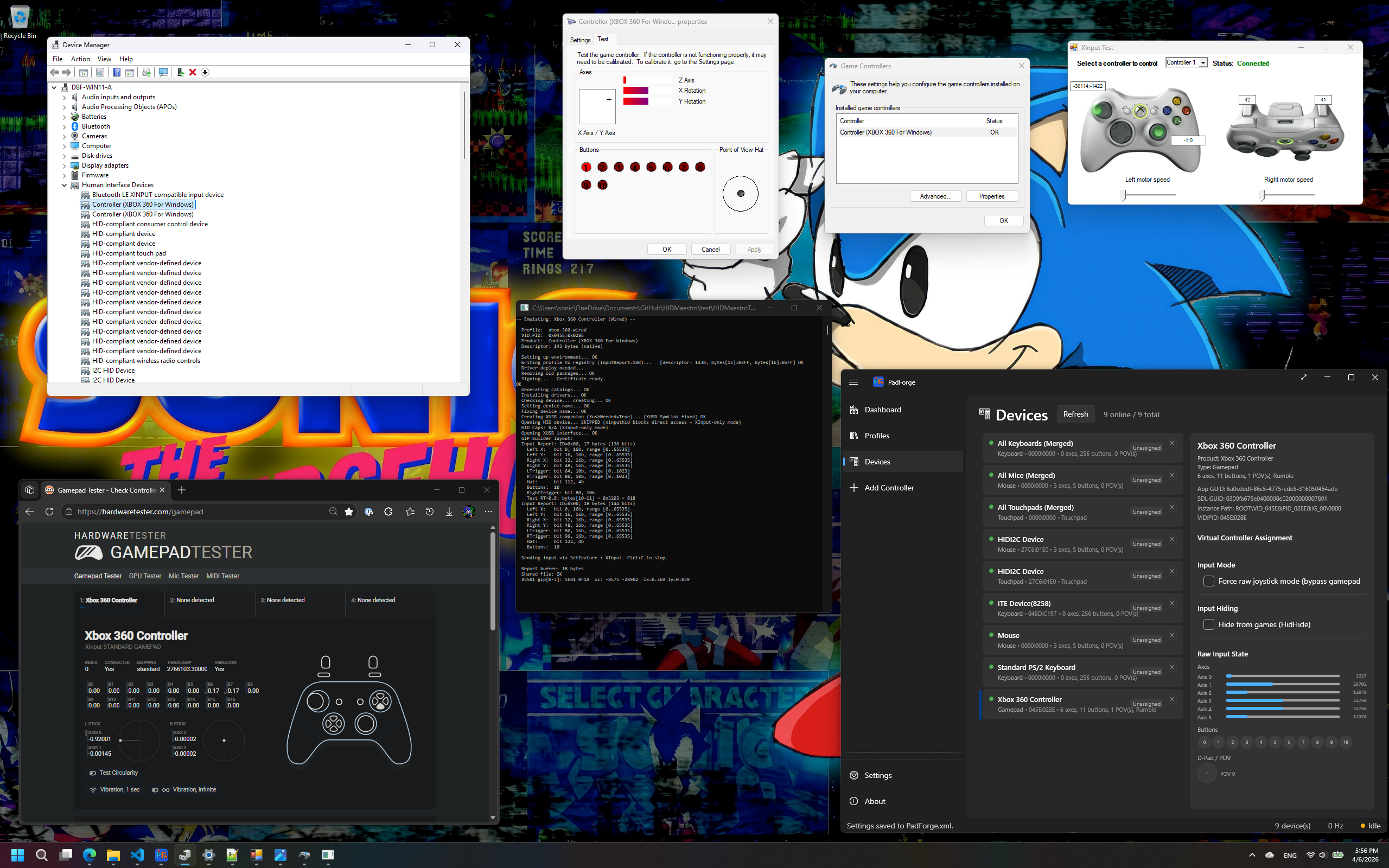
A virtual Xbox 360 Wired controller shown identically in Device Manager, joy.cpl, Chrome Gamepad Tester, and PadForge/SDL3
Validated across the stack

46 scenarios, two machines, every change.

A 46-scenario regression battery checks DirectInput, XInput, SDL3, the browser Gamepad API, and WGI on every change, passing on both a 16-core Windows 11 desktop and a low-power Intel Atom Windows 10 machine. A real Xbox Series X|S Bluetooth controller tested side by side shows byte-identical behavior across the HID class APIs.

Multi-controller

Six pads, every API, correct order.

No hard limit on simultaneous virtual controllers. Tested with 6 mixed types, correct per-controller ordering across every API. XInput caps Xbox-family profiles at its own 4 slots; non-Xbox profiles run beyond it.

Hot-plug

Create, swap, and remove live.

Create and remove controllers on the fly, about 200 ms for a single controller. Live-swap a controller's profile mid-session. No reboots, no leftover devices.

Force feedback

FFB games get their answers.

HID PID 1.0 answers for DirectInput force-feedback games, plus rumble and haptic output events the consumer routes to real hardware. The driver accepts the writes and raises them to your application in real time.

Compare

How it compares.

HIDMaestro is Windows optimized and focused on game controllers and HID game devices. Within that scope it gives you exact hardware identity with no kernel driver, no network layer, and no per-device code. The composite USB personas are the one deliberate exception: controller audio needs a driver-backed USB device, so those three profiles deploy a signed third-party transport that ships inside the DLL. Pick any other profile and nothing kernel-mode is ever installed.

Tool by tool
HIDMaestro VIIPER ViGEmBus vJoy WinUHid
Kernel driver requiredNo, except the composite USB personasYes (USBIP)YesYesNo (on VHF)
Installs without test-signingYesYesYesYesNo
Network playApp layer via consumers (PadForge Remote Link)In the driver: +1-5 ms wired, +10-50 ms Wi-FiNoNoNo
Exact identity, incl. Bluetooth busYes, 228 profilesUSB only2 fixed typesFixed identity4 presets, USB only
Add a new deviceJSON, or capture one you ownWrite Go per deviceN/AN/AWrite C, or raw descriptor
Local single-press latency~35 µs measured168 µs publishedN/AN/ANot published
StatusActiveActiveRetiredStaleActive

The spec sheet

Every feature, end to end.

Short punch list. Each card is one feature. The documentation covers each in full.

No kernel driver, no test-signing

Runs entirely in user mode via UMDF2, loaded by a locally trusted self-signed certificate. No test-signing mode, no purchased certificate, no reboot. It installs on a normal PC, not just a developer box, and a bug cannot blue-screen the machine.

Controller audio and haptics

Three composite USB personas present the pad's speaker, microphone, and voice-coil actuators, so Windows gets real audio endpoints and a game's authored haptic waveforms reach your code. The USB transport those need is embedded in the same DLL and deploys itself on first use.

No network in the path

Input travels through shared memory on the same machine. No socket, no USBIP stack, no kernel transport driver between your application and the device.

Exact hardware identity

Profile-driven VID/PID, product strings, HID descriptors, and bus type. A Bluetooth controller reports as Bluetooth, not as a USB device wearing its name.

228 device profiles

Embedded profiles across 32 vendors: Xbox 360, Xbox Series, DualSense, Thrustmaster, Logitech, flight sticks, racing wheels, and more.

Every gaming API

DirectInput, XInput, SDL3/HIDAPI, browser Gamepad, WGI/GameInput, and RawInput all see the same real controller at once.

Validated across the stack

A 46-scenario regression battery checks DirectInput, XInput, SDL3, the browser Gamepad API, and WGI on every change, passing on both a 16-core Windows 11 desktop and a low-power Intel Atom Windows 10 machine.

Devices are JSON, not hardcoded

Add a controller by writing a data-only JSON profile or capturing one you already own. No per-device source code, no recompile, no hardcoded device classes.

Hot-plug support

Create and remove controllers on the fly. About 200 ms for a single controller. No reboots, no leftover devices.

Multi-controller

No hard limit on simultaneous virtual controllers. Tested with 6 mixed types, correct ordering across every API.

MIT licensed

Free and open source. Use it in your own projects, commercial or otherwise, with no restrictions.

See it

The same controller, everywhere Windows looks.

Built to be built on.

HIDMaestro is a developer platform: a C# SDK and a matching user-mode driver.
Clone the repo or grab a release to get started. MIT licensed, free forever.

Prerequisites:

  • Windows 10 or 11 (x64)
  • .NET 10 runtime
  • Administrator privileges for virtual device creation
  • Visual Studio 2022+ to build from source, with Windows SDK/WDK 10.0.26100.0

If you want to use HIDMaestro through a UI instead of code, install PadForge. It wraps this SDK with a full input-mapping app.